
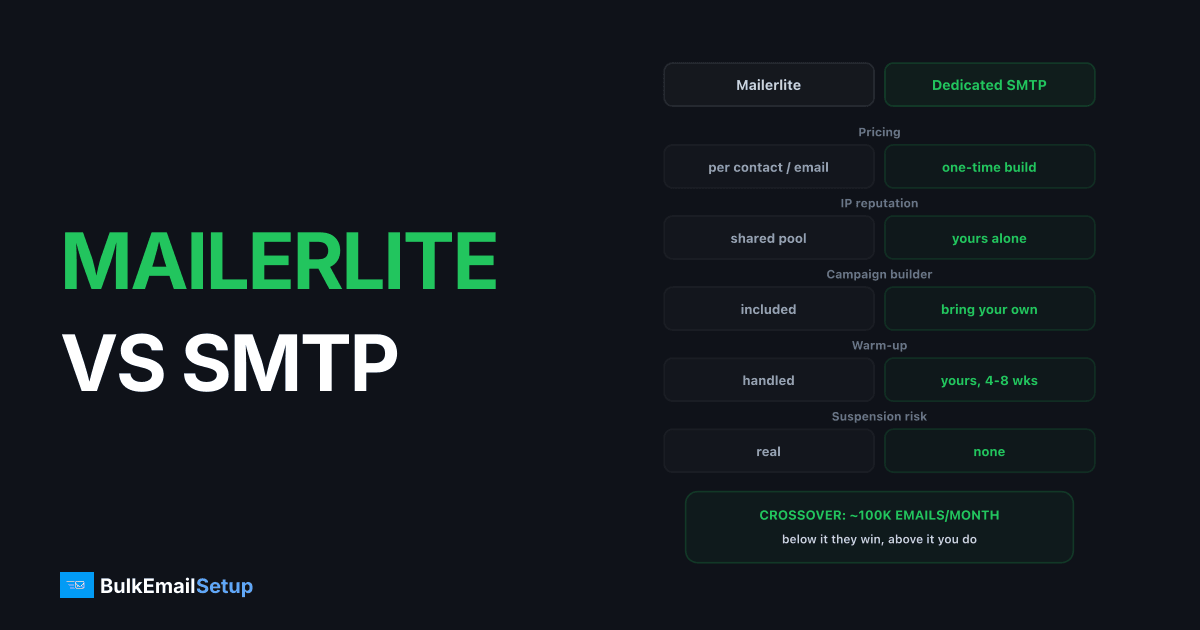
MailerLite is genuinely good value below about 50,000 subscribers, and stops being the cheap option shortly after. Its pricing is contact-based, so it charges for stored subscribers rather than emails sent, and that curve climbs faster than most people plan for. A dedicated SMTP server is a one-time build with no per-contact or per-email fee, but it is sending infrastructure rather than a marketing platform.
The two are not really competitors. They solve different halves of the problem, and the right question is where the crossover sits.
Side by side
| Factor | MailerLite | Dedicated SMTP |
|---|---|---|
| Pricing model | Per stored contact | One-time build |
| Cost at 100K contacts | ~$360-500/mo | Fixed, no per-contact fee |
| IP reputation | Shared pool | Yours alone |
| Dedicated IPs | Higher tiers, add-on | Included |
| Campaign builder | Yes, good one | No, pair with a mailer |
| Automation | Yes | No |
| Landing pages, forms | Yes | No |
| Warm-up | Provider handles | Yours, 4-8 weeks |
| List hygiene | Partly automated | Yours |
| Suspension risk | Real, shared-pool policy | None, IPs are yours |
The row that decides most migrations is the first one. Contact-based pricing means a 200,000-subscriber list costs the same in a month you send nothing as in a month you send four campaigns.
Where the cost crosses over
| List size | Which wins |
|---|---|
| Under 25K subscribers | MailerLite wins clearly |
| 25K - 50K | MailerLite still good value |
| 50K - 100K | roughly even, depends on send frequency |
| Over 100K | dedicated wins, and the gap widens |
Below 25,000 subscribers there is no argument. You get a builder, automation, forms and hosting for less than the cost of the coffee involved in setting up a server.
Past roughly 100,000 contacts you are paying $360 to $500 a month, forever, and still sending from shared IPs. A one-time dedicated build pays back inside two months against that, then costs nothing further. Full numbers in what 500,000 emails a month costs.
What "shared IP pool" means in practice
This phrase appears in every comparison and rarely gets explained.
On MailerLite your mail leaves from IP addresses used by many other senders. Receiving networks such as Gmail score those IPs collectively, so your delivery reflects the behaviour of everyone on them, not only yours.
| What happens | Effect on you |
|---|---|
| Another sender's complaint spike | your mail slows or filters, with no notice |
| MailerLite's abuse team acting fast | protects you from the above |
| Your own complaint spike | they suspend you to protect everyone else |
| Your careful sending | subsidises riskier senders on the same IP |
That is a reasonable trade at small scale. The provider's reputation management is genuinely doing work you would otherwise do yourself, and you get instant sending with no warm-up.
It stops being a good trade when your volume is large enough that you could hold your own reputation, because then you are carrying pool risk without needing the pool.
What Gmail actually requires either way
Worth being clear that platform choice does not exempt you from the sender rules. Google's bulk sender guidelines apply to anyone sending over 5,000 messages a day to Gmail addresses, regardless of who carries the mail:
- SPF and DKIM on the sending domain
- A DMARC record, even at
p=none - One-click unsubscribe in the header
- Spam complaint rate under 0.3%, ideally under 0.1%
- Valid forward and reverse DNS on the sending IP
MailerLite handles the DNS and IP side for you. The complaint rate is yours in both models, and it is the requirement that actually breaks campaigns.
What you actually give up
This is the part comparison articles usually skip. A dedicated SMTP server sends mail. It does not:
- Build campaigns visually
- Run automation workflows
- Host landing pages or signup forms
- Manage subscriber records
- Give you a support team when a campaign misbehaves
Most senders who move do not go without those. They run MailWizz, Sendy, Mautic or Listmonk on top of their own SMTP, which restores the campaign layer at a one-time or low monthly cost. That is the honest shape of the migration: you replace one bill with a build plus a cheaper piece of software, and you take on warm-up and hygiene.
The deliverability difference
On MailerLite you send from shared IP pools. Their abuse team polices complaint rates aggressively, because one bad sender damages everyone on that IP. That is good for you when you are the careful sender and bad for you when someone else is not, and you have no visibility either way.
On dedicated IPs the reputation is entirely yours. No one else can damage it, and nobody is policing your legitimate use case as a risk to other customers. The cost is that poor list quality has nowhere to hide, and you own the 4 to 8 week warm-up. See dedicated IP vs shared IP for the full trade.
Where the money actually goes
MailerLite's headline price is not the whole bill at larger sizes.
| Line item | Notes |
|---|---|
| Base plan | scales with stored contacts, not sends |
| Dedicated IP | higher tiers only, usually an add-on |
| Extra sends | some plans meter sends beyond a multiple of contacts |
| Validation | per address, if you clean through them |
The contact-based model is the important one. You are billed for storage of people you may not be mailing, which means an unengaged 30% of your list costs the same as your best customers. Cleaning the list is the highest-return action available on any per-contact platform, and it improves delivery at the same time. See email list cleaning.
The migration, honestly
If you do move, this is the shape of it.
Week 1. Stand up the server, IPs and authentication on a sending subdomain. Publish
SPF, DKIM and DMARC at p=none. Confirm PTR matches the HELO hostname.
Week 2. Install the campaign software and import your list. Export MailerLite's suppression list first and load it, because you are legally required to keep honouring those opt-outs.
Weeks 3-10. Warm up. Start at a few hundred a day per IP to your most engaged segment, ramp roughly 30% every two days, watch deferral rates rather than opens.
Ongoing. Weekly checks on complaint rate, bounce rate and Google Postmaster Tools.
The part people underestimate is weeks 3 to 10. You cannot run your normal campaign schedule during warm-up, so plan for a period of reduced sending, and keep MailerLite running until the new path is carrying full volume.
Which to pick
Stay on MailerLite if you are under 50,000 subscribers, value the builder and automation, and do not want to own infrastructure. It is a well-run product at that size.
Move to dedicated if you are past 100,000 contacts, the per-contact bill is annoying you, your list is clean, and someone will own warm-up and hygiene. Pair it with a self-hosted mailer.
Run both is also common and often correct: MailerLite for automated lifecycle mail to engaged subscribers, dedicated infrastructure for the large campaign sends where the per-contact pricing hurts most.
Questions worth settling first
How often do you send? A 100,000-contact list mailed weekly gets real value from a platform. The same list mailed monthly is paying a subscription mostly for storage.
How clean is the list? Dedicated IPs amplify list quality in both directions. If 20% of your contacts have not opened anything in a year, fix that before deciding anything, because it changes both the bill and the delivery picture.
Who will own warm-up? Eight weeks of daily attention. If that is nobody's actual job, stay on shared infrastructure. This is the single most common reason self-managed sending fails.
Do you use the automation? If your flows are doing real work, a dedicated server does not replace them. You would run separate campaign software on top, which is more moving parts than most small teams want.
What is your growth path? If you expect to double the list in a year, run the numbers at that size rather than today's, because per-contact pricing compounds.
How BulkEmailSetup helps
We build the sending half: your own server, your own IPs, full SPF/DKIM/DMARC/PTR configuration, MTA tuning, bounce handling and a warm-up plan. You keep whatever campaign software you prefer on top.
Basic starts at $549 one-time, covering 1 SMTP server, 3 dedicated IPs, 25,000 emails/day and unlimited contacts, which is the part that matters when you are being charged per contact elsewhere. See pricing, or is a dedicated IP worth it if you are still weighing the move.
Frequently asked questions
Is MailerLite good for bulk email?
Up to roughly 50,000 subscribers, yes. It is one of the better-value platforms at that size, with a usable builder, automation and reasonable deliverability on its shared pools. Above 50,000 subscribers the contact-based pricing climbs steeply and you are still sending from shared IPs, which is where a dedicated server becomes the better economic and technical choice.
How much does MailerLite cost at 100,000 subscribers?
Around $360 to $500 a month depending on plan and send volume, and that is charged on stored contacts rather than emails sent, so a quiet month costs the same as a heavy one. A dedicated SMTP build handling comparable volume is a one-time cost with no per-contact or per-email fee.
Does MailerLite offer dedicated IPs?
Only on higher-tier plans and typically for accounts sending consistently high volume, usually as a paid add-on. Below that you are on shared IP pools, meaning other senders' complaint rates affect your delivery and you have no visibility into or control over that.
Should I move from MailerLite to my own SMTP server?
Consider it once you pass roughly 50,000 subscribers or 500,000 emails a month, and only if someone will own warm-up and list hygiene. You gain your own IP reputation and lose the per-contact fee. You give up the campaign builder and automation, so most senders keep a mailer such as MailWizz or Sendy on top of their own SMTP.
What do you lose by moving off MailerLite?
The visual builder, automation workflows, landing pages, form hosting and the support team. A dedicated SMTP server is sending infrastructure, not a marketing platform, so you pair it with self-hosted software like MailWizz, Sendy, Mautic or Listmonk to replace that layer.


