
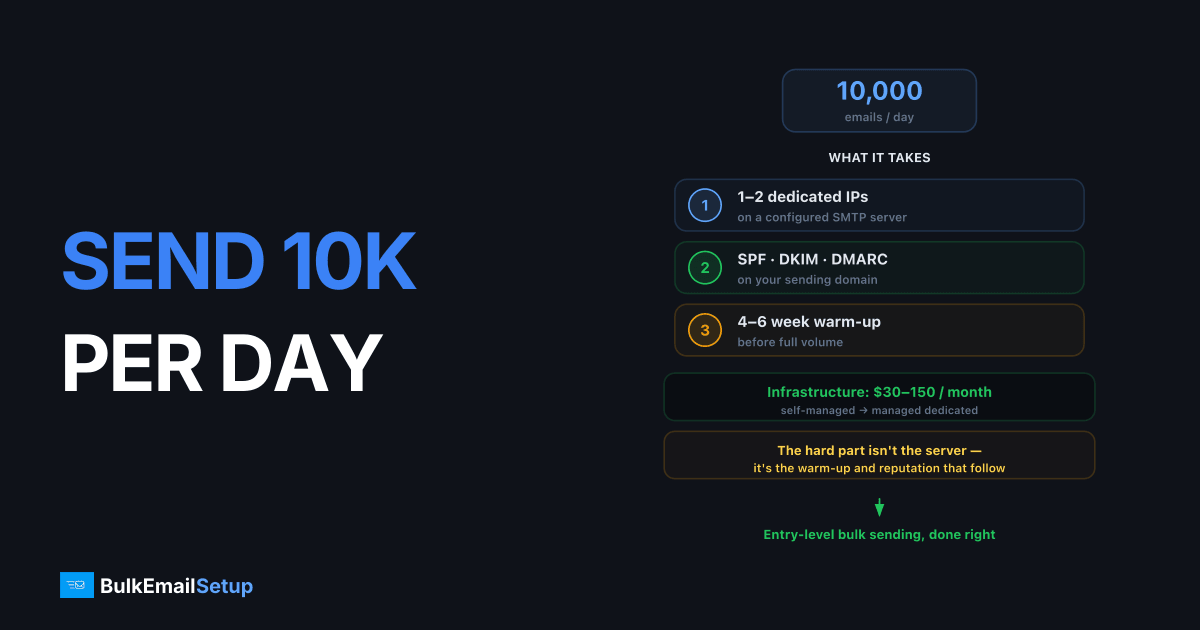
To send 10,000 emails a day you need one or two dedicated IPs on a properly configured SMTP server, SPF/DKIM/DMARC authentication on your sending domain, and a 4-6 week IP warm-up before you hit full volume. The infrastructure itself costs $30-150 per month depending on whether you self-manage or use a managed dedicated SMTP provider. The hard part is not the server, it is the warm-up and the reputation management that follows.
What 10,000 emails a day actually requires
10K/day is a meaningful volume. It is past the point where ESP shared pools and Workspace accounts work, but well below the scale where you need a multi-IP rotation pool.
| Component | What you need at 10K/day |
|---|---|
| Dedicated IPs | 1 (2 if Microsoft/Yahoo heavy) |
| Sending domains | 1 subdomain (e.g. mail.yourdomain.com) |
| SMTP server | 2 vCPU / 4 GB RAM VPS is plenty |
| MTA software | Postfix, PowerMTA, or a managed stack |
| Warm-up period | 4-6 weeks from zero |
| Monthly cost | $30-80 self-managed, $50-150 managed |
One healthy IP can push 50K+ emails a day to most providers, so 10K/day is comfortably single-IP territory. The reason to add a second IP is throttling: Outlook.com in particular rate-limits new and low-reputation IPs hard, and splitting volume keeps each IP under per-provider hourly caps.
Step 1: Set up the sending domain
Never send bulk mail from your root domain. Use a subdomain like mail. or send. so a reputation problem never touches your corporate mail, the full reasoning is in our subdomain vs root domain guide.
Publish all three authentication records before the first email leaves the server:
# SPF - authorize your server's IP
mail.yourdomain.com.  TXT  "v=spf1 ip4:203.0.113.10 -all"

# DKIM - 2048-bit key, selector of your choice
s1._domainkey.mail.yourdomain.com.  TXT  "v=DKIM1; k=rsa; p=MIIBIjANBg..."

# DMARC - start at p=none, move to quarantine after 2 weeks of clean reports
_dmarc.mail.yourdomain.com.  TXT  "v=DMARC1; p=none; rua=mailto:dmarc@yourdomain.com"
Verify with dig before sending anything:
dig TXT mail.yourdomain.com +short
dig TXT s1._domainkey.mail.yourdomain.com +short
dig TXT _dmarc.mail.yourdomain.com +short
Gmail and Yahoo both enforce authentication for bulk senders, since their 2024 sender requirements, anyone sending 5,000+ messages a day to Gmail must pass DMARC alignment and offer one-click unsubscribe. At 10K/day you are squarely inside that rule.
Step 2: Set up the SMTP server
A small VPS handles 10K/day without breaking a sweat. The non-negotiables:
- Reverse DNS (PTR) that matches your HELO hostname.
203.0.113.10→mail.yourdomain.comand back again. - Clean IP history. Check the IP against Spamhaus, Barracuda, and SpamCop before you accept it from your host. If it is listed, ask for a different one, see our Spamhaus delisting guide if you are stuck with a listed IP.
- TLS on port 587 for submission, opportunistic TLS for delivery.
- Bounce processing. Hard bounces must be removed automatically. A 10K/day sender with a 5% bounce rate gets blocklisted within days.
If you would rather not build this yourself, our SMTP server setup guide walks through the full Postfix configuration.
Step 3: Warm up the IP, the part everyone rushes
A brand-new IP that sends 10,000 emails on day one will be throttled or blocked by every major provider. Mailbox providers score IPs on sending history, and a new IP has none.
A realistic ramp to 10K/day:
| Week | Daily volume | What to watch |
|---|---|---|
| 1 | 50 → 500 | Deliver to your most engaged recipients only |
| 2 | 500 → 1,500 | Bounce rate under 2%, complaints under 0.1% |
| 3 | 1,500 → 4,000 | Check Google Postmaster Tools daily |
| 4 | 4,000 → 7,000 | Watch Microsoft SNDS for yellow/red days |
| 5-6 | 7,000 → 10,000 | Hold volume steady 3-4 days before each increase |
Rules that matter more than the exact numbers:
- Send to engaged recipients first. Opens and replies during warm-up build reputation faster than raw volume.
- If bounces spike above 3% or you see deferrals (4xx responses), freeze volume for 2-3 days. Do not push through.
- Spread sends across the day. 10,000 emails in one burst at 9 a.m. looks like spam; the same volume over 10 hours looks like a business.
We publish a full day-by-day plan in our IP warm-up schedule.
Step 4: Monitor reputation from day one
Two free dashboards are mandatory at this volume:
- Google Postmaster Tools, domain and IP reputation, spam rate, authentication results for Gmail traffic.
- Microsoft SNDS, per-IP complaint data and spam-trap hits for Outlook/Hotmail traffic. Our SNDS guide covers registration and how to read the colors.
Add a weekly blocklist check across Spamhaus, Barracuda, and SpamCop. Catching a listing in 24 hours instead of a week is the difference between a quick delist and a damaged domain.
Real costs at 10,000 emails a day
| Approach | Monthly cost | Trade-off |
|---|---|---|
| Self-managed VPS + Postfix | $30-80 | You own warm-up, monitoring, delisting |
| Managed dedicated SMTP | $50-150 | Provider handles warm-up and reputation |
| Transactional ESP (SES, etc.) | $10-30 in fees | Shared reputation risk, content restrictions |
| Cold-email ESP shared pool | $50-100 | Pool reputation outside your control |
The per-email cost is trivial at every tier. What you are actually paying for is reputation management, and that is where most self-managed setups fail in month two or three, usually after one bad list import.
Common ways 10K/day senders blow up their IP
- Importing an old list. A list older than 6 months is full of dead addresses and recycled spam traps. Verify before you send.
- Skipping the warm-up after a pause. An IP idle for 30+ days needs a partial re-warm; reputation decays.
- Ignoring deferrals. 4xx temp-fails are a provider telling you to slow down. Senders who retry aggressively convert deferrals into blocks.
- One domain, one IP, no headroom. When that single IP gets listed, you are offline. At minimum, have a warmed backup plan.
How BulkEmailSetup helps
We build and manage dedicated SMTP servers with clean IPs, handle the entire warm-up schedule for you, and monitor blocklists and provider feedback loops so a listing gets caught and fixed before it hurts your campaigns. If you want 10K/day capacity without spending six weeks babysitting an IP, see our pricing.
Frequently asked questions
How many IPs do I need to send 10,000 emails per day?
One warmed dedicated IP handles 10,000 emails a day comfortably. Add a second IP if your list skews heavily toward Microsoft or Yahoo mailboxes, which throttle per-IP volume more aggressively.
How long does it take to warm up an IP for 10,000 emails a day?
Plan for 4 to 6 weeks. You start around 50-100 emails on day one and roughly double volume every 2-3 days while watching bounce and complaint rates.
Can I send 10,000 emails a day from Gmail or Google Workspace?
No. Google Workspace caps you at 2,000 recipients per day per account, and bulk sending through it violates their terms. You need a dedicated SMTP server or a transactional ESP.
What does it cost to send 10,000 emails a day?
A self-managed dedicated SMTP server with one IP runs roughly $30-80 per month for the server plus your time. Managed dedicated SMTP services typically run $50-150 per month at this volume.


