
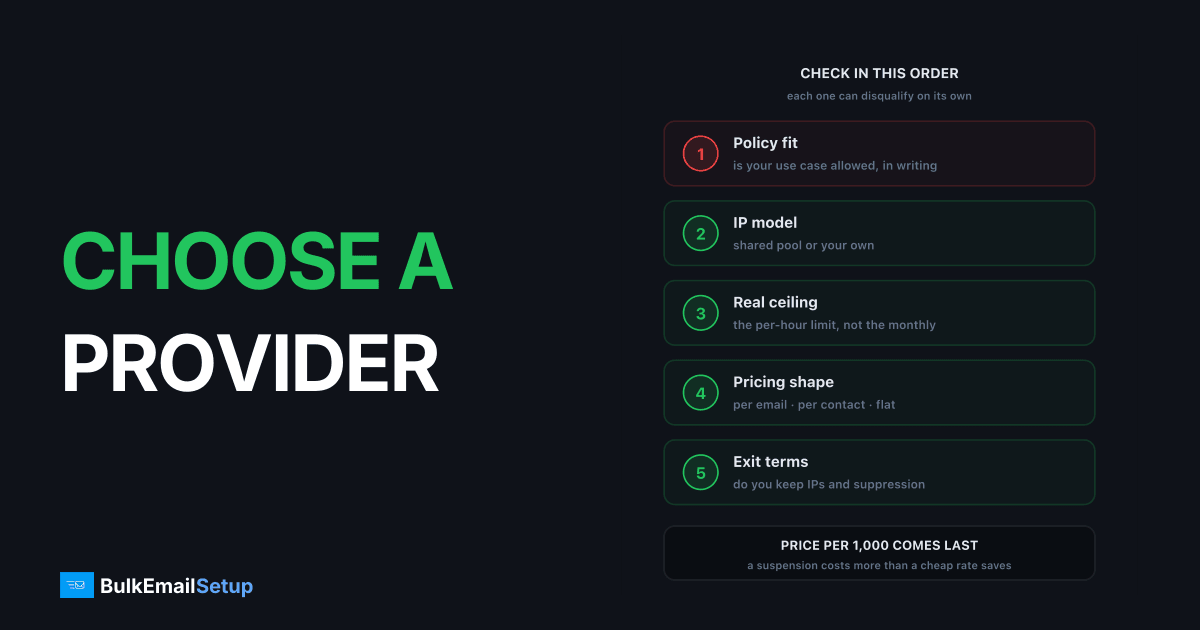
Most bulk email comparisons rank providers by price per thousand emails, which is the least useful number in the decision. Nine things matter more, and the first one on the list eliminates more providers than price ever does: whether your specific use case is permitted at all.
Work through these in order. Each one can disqualify a provider on its own.
1. Policy fit, in writing
Ask directly whether your use case is permitted, and get it in writing before you pay. Cold outreach, affiliate offers, and several industry categories are banned by most shared-pool providers, and enforcement happens after you have migrated, not before.
This causes more failed migrations than every technical factor combined. A provider that suspends you in month two has cost you more than an expensive one that does not.
2. Shared or dedicated IPs
| Factor | Shared pool | Dedicated |
|---|---|---|
| Your reputation depends on | Everyone on the IP | Only you |
| Setup speed | Immediate | 4-8 week warm-up |
| Suspension risk | Real, policed hard | None from other senders |
| Cost shape | Per email | Flat or one-time |
| Right for | Under 50K/month | Over 100K/month |
Ask how many senders share your IP. A provider that cannot or will not answer is telling you something.
3. The real volume ceiling
Monthly plan limits are the number providers advertise. The one that bites is the per-hour or per-day throttle, which is often not published. A plan that permits 2 million a month but throttles at 5,000 an hour cannot send a 400,000-address campaign in a morning.
Ask for the per-hour figure specifically, and size against your peak day, not your monthly average. See how many emails per day per IP.
4. The pricing shape
Three models, and they behave very differently as you grow:
| Pricing model | Scales with | What that means |
|---|---|---|
| Per email | sends | predictable, grows forever |
| Per contact | list size | charges you in quiet months too |
| Flat / build | nothing | cheapest at volume, you own more |
Per-contact pricing is the one that surprises people. A 200,000-subscriber list costs the same in a month you send nothing. Check hidden costs of ESP overage fees for what sits on top of the headline rate.
5. What happens on overage
Ask whether exceeding your tier throttles you, bills you at a higher rate, or suspends sending. All three exist in the market. Being throttled mid-campaign is worse than being billed, and being suspended mid-campaign is worse than both.
6. Authentication and control
You should be able to set your own SPF, DKIM and DMARC on your sending domain, and have a PTR record matching your HELO hostname. A provider that will not let you control authentication on your own domain limits how far your deliverability can improve. See SPF vs DKIM vs DMARC.
7. Support response time, and whether it is paid
When a campaign is blocked, response time is the only support metric that matters. Ask what it is, and whether the number they quote applies to your plan or to a tier you are not buying. At volume, a blocked campaign waiting three days on a ticket is expensive.
8. Bounce and complaint tooling
You need per-campaign complaint rates, hard versus soft bounce separation, and automatic suppression. Without these you are flying blind, and the first sign of a problem is a suspension. Bounce management covers what good looks like.
9. Exit terms
The question people never ask until they need to: if you leave, what do you keep? Specifically, can you export suppression lists, do you keep the IPs and their warmed reputation, and is there a contract minimum. Reputation you spent eight weeks building should not evaporate because you changed vendor.
What the receiving networks demand, whoever you pick
None of this is a provider feature. It applies to you on every option, and it is worth knowing before you evaluate anyone, because a provider that makes these harder is disqualifying itself.
Google's bulk sender guidelines apply to anyone sending over 5,000 messages a day to Gmail addresses:
| Requirement | Detail |
|---|---|
| SPF and DKIM | both, on the sending domain |
| DMARC | published, p=none is enough to start |
| One-click unsubscribe | List-Unsubscribe-Post header |
| Spam complaint rate | under 0.3%, target 0.1% |
| Forward and reverse DNS | PTR matching the HELO hostname |
| TLS | for transmission |
Microsoft has tightened equivalent rules, and Yahoo runs its own. So when you ask a provider question 7 about authentication control, you are checking whether they let you meet a requirement you are already subject to.
How to actually test a provider
Never migrate on a sales call. Run this before committing.
1. Send to a real segment. 1,000 to 5,000 addresses from your actual list, not a test list. Test lists tell you nothing about how your real mail performs.
2. Measure placement, not delivery. "Delivered" means the receiving server accepted the message. It says nothing about whether it reached an inbox. Use a seed list across Gmail, Outlook, Yahoo and a corporate domain. See seed list vs real inbox placement.
3. Check the assigned IP against Spamhaus, Barracuda and SORBS on day one, before the first real send. Recycled IPs arrive pre-listed more often than providers admit.
4. Send at your peak rate, not your average. This is where the undisclosed hourly throttle shows up.
5. Trigger a bounce deliberately. Send to a known-dead address and confirm the provider classifies and suppresses it correctly.
6. Open a support ticket. Ask something real and time how long the answer takes. This is the only way to test the number they quoted you.
The short version
| Your situation | Likely fit |
|---|---|
| Under 50K/month, clean opt-in list | Shared relay, cheapest that permits your use case |
| 50K-250K/month, growing | Compare relay against a dedicated build honestly |
| Over 250K/month | Dedicated, unless you need platform features |
| Restricted use case | Dedicated, because policy is the blocker |
| Nobody owns deliverability | Shared relay, and hire for it before scaling |
That last row is the one people ignore. Dedicated infrastructure without someone watching complaint rates weekly degrades quietly. If nobody will own it, shared is genuinely the safer choice.
Reading a pricing page honestly
Providers price on different axes, which makes direct comparison harder than it looks. Normalise everything to cost per month at your real volume before comparing.
| Model | Watch for |
|---|---|
| Per email | overage rate above the tier rate |
| Per contact | you pay in months you send nothing |
| Per contact + send cap | both limits apply, whichever binds first |
| Flat / owned | what is excluded, and support terms |
Then add the lines that never appear in the headline figure:
- Dedicated IPs, typically $25 to $80 each per month, and you need several at volume
- Validation, charged per address, which matters when cleaning a large list
- Support SLA, often a paid tier
- Overage, billed at a worse rate than the plan it exceeds
- Contract minimum, which turns a monthly price into an annual commitment
A provider at $600 a month with $200 of add-ons is more expensive than one at $700 with none. The published number is the start of the calculation, not the end of it. See hidden costs of ESP overage fees.
The three ways this goes wrong
Patterns worth recognising, because each one is avoidable at the evaluation stage.
Migrating a bad list to a new provider. The most common and most expensive. Every provider enforces the same bounce and complaint signals, so a list that got you suspended once will do it again in six weeks. Clean the list before you evaluate anyone, or you are testing providers against a problem you brought with you. See email list cleaning.
Buying on price at a volume you have not reached. A provider that is cheapest at your current 30,000 a month may be expensive at 300,000, and migrating twice costs more than either. Run the numbers at the volume you expect in a year.
Choosing dedicated infrastructure with nobody to own it. Dedicated IPs need someone watching complaint rates weekly and managing an 8-week warm-up. Without that owner they degrade quietly and perform worse than a well-run shared pool. This is a staffing question dressed up as a technology question.
When the answer is "not yet"
Worth saying plainly, because most comparison content assumes you should be buying something.
| Situation | Better move |
|---|---|
| Under 50,000/month | stay on a shared relay, spend the effort on authentication |
| List not cleaned in 12 months | clean it first, then re-evaluate |
| No SPF/DKIM/DMARC yet | fix that, it moves delivery more than any provider switch |
| Nobody owns deliverability | hire or assign someone before scaling |
| Just been suspended | diagnose the cause before migrating it |
Authentication and list hygiene are free and move delivery more than switching provider ever will. If either is outstanding, do it first and re-run this checklist afterwards with cleaner numbers.
How BulkEmailSetup helps
We build the dedicated option: your own server, your own IPs, full SPF/DKIM/DMARC/PTR configuration, MTA tuning, bounce handling and a warm-up plan. No shared pool, no policy team weighing your use case against other customers' risk, and the IPs stay yours.
Basic starts at $549 one-time, covering 1 SMTP server, 3 dedicated IPs, 25,000 emails/day and unlimited contacts. Higher tiers scale to 15 IPs and 200,000 emails/day. See pricing, or when do you need a dedicated SMTP server if you are still sizing the decision.
Frequently asked questions
What should I look for in a bulk email provider?
In order of how often they cause problems: whether your use case is permitted by policy, whether IPs are shared or dedicated, the real volume ceiling including per-hour throttles, the pricing shape (per email, per contact, or flat), support response times, and how easily you can leave with your data and reputation intact. Price per thousand emails matters less than any of these.
Is a cheaper bulk email provider always worse?
Not always, but cheap usually means shared IP pools and lighter support, which is fine for clean opt-in lists at modest volume and poor for anything else. The genuine red flags are providers that permit purchased lists, publish no abuse policy, or cannot tell you how many senders share your IP.
How many emails a month before I need dedicated IPs?
Roughly 50,000 a month is where dedicated IPs start being worth discussing, and 100,000 to 250,000 is where the cost case becomes clear. Below that, shared pools are cheaper and the provider's reputation management is genuinely doing you a favour. Above it you are subsidising other senders' behaviour.
What questions should I ask before signing up?
Is my specific use case permitted in writing? Are IPs shared or dedicated, and how many senders share mine? What is the per-hour as well as per-month limit? What happens on overage? What is the support response time, and is it a paid tier? If I leave, do I keep the IPs and can I export suppression lists?
Can I test a bulk email provider before committing?
Yes, and you should. Send a real segment of 1,000 to 5,000 addresses, not a test list, and measure inbox placement with a seed list rather than trusting the provider's delivered percentage. Delivered only means accepted by the receiving server, not that it reached an inbox.


